Free SEO tools will fix your broken meta tags and slow images. They will not write a single ranking article for you. Free SEO automation tools for WordPress and Shopify are genuinely useful for the mechanical side of SEO — alt text, redirects, schema markup, speed — but almost every one of them stops short of the thing that actually moves rankings: publishing content that targets keywords you're currently losing.
That gap matters more than most SEO advice admits. A perfectly optimized page with nothing to say about the keywords your competitors rank for is still an empty page. So before you install another plugin, it helps to know exactly what free tools solve, what they quietly skip, and where the ceiling is.
What Do Free SEO Automation Tools Actually Fix?
Free SEO automation tools for WordPress and Shopify handle technical hygiene: broken links, missing alt text, thin meta descriptions, slow-loading images, and basic schema markup. They audit what's already on your site and patch obvious errors automatically, but they don't identify new keyword opportunities or generate the content needed to rank for them.
That's the honest boundary. Here's what falls on each side of it, based on what the most-installed free tools in both ecosystems actually do:
- Meta tag and title tag optimization — nearly every free plan includes this.
- Image compression and lazy loading to cut page load time.
- Broken link detection and automatic redirect creation.
- Alt text generation, often AI-assisted now.
- Basic JSON-LD structured data for products and blog posts.
- Surface-level SEO scoring on existing pages (a checklist, not a strategy).
- Sitemap generation and submission.
Every one of these is a real fix. None of them tells you that a competitor is ranking for "shopify inventory sync tool" and you have zero content touching that phrase. That's a different job, and free tools weren't built to do it.
WordPress vs. Shopify: Where the Free Tools Differ
WordPress's free ecosystem is older and more mature — Yoast, Rank Math, and All in One SEO have been iterating for over a decade, and their free tiers cover meta control, readability scoring, XML sitemaps, and basic schema. Shopify's app store took longer to catch up because Shopify's platform is more locked-down; most free Shopify SEO apps focus on image optimization, alt text, and speed because those are the levers merchants can pull without touching theme code.
The practical difference: a WordPress free plugin gives you more manual control (you can edit metadata field by field), while a Shopify free app leans more automated by necessity, since most store owners aren't editing Liquid templates. Neither ecosystem's free tier, though, generates net-new content briefs based on what your competitors rank for and you don't. That's the piece both platforms leave for paid tools or manual research.
| Tool type | Best for | Free tier covers | Free tier misses |
|---|---|---|---|
| WordPress SEO plugin (Yoast, Rank Math) | Bloggers, SaaS marketing sites | Meta tags, readability, sitemaps, basic schema | Keyword gap analysis, content generation |
| Shopify SEO app (image/speed focused) | Ecommerce stores | Alt text, image compression, broken links | Blog content strategy, GSC-driven fixes |
| GSC (Google Search Console) itself | Any site | Raw performance data, indexing status | Interpretation, prioritization, action |
| Manual keyword research (free tier of a paid tool) | Solo founders on a budget | Limited keyword volume data | Ongoing tracking, automated briefs |
The Free Tools Worth Actually Installing
You don't need ten plugins. You need two or three that don't overlap.
For WordPress, Yoast SEO and Rank Math both cover the fundamentals in their free versions — title and meta control, an XML sitemap, basic readability checks, and canonical URL management. Rank Math's free tier tends to include more built-in checks (broken link monitoring in some builds, 404 tracking) without needing a paid upgrade, which is why a lot of indie founders default to it over Yoast now.
For Shopify, the free apps worth your time are the ones focused narrowly on image and speed optimization, since that's where Shopify stores lose the most points in Core Web Vitals. Apps that bundle in AI blog generation on the free tier exist, but the output quality on a free plan is usually capped — either in word count, number of posts per month, or how much competitor context the AI actually uses to write.
Google Search Console itself deserves a mention here because it's free, it's not optional, and almost nobody uses it properly. GSC tells you which queries you already rank for on page two, which pages have dropped impressions, and which URLs Google isn't indexing. It's raw data with no interpretation layer, which is exactly where it becomes valuable when paired with a tool that reads it and tells you what to fix. (When something dips, here's how to diagnose Google Search Console ranking drops.)
Where Free Tools Hit a Wall
Here's the pattern across every free SEO automation tool on both platforms: they optimize what exists. They do not tell you what's missing.
A free plugin will happily give your homepage a green checkmark for keyword density while your competitor sits on page one for twelve keywords you've never targeted. That's not a bug in the free tools — it's simply outside their scope. Keyword gap analysis — the process of finding terms competitors rank for that you don't — requires crawling competitor domains and cross-referencing ranking data. That's compute-intensive, which is exactly the kind of feature vendors put behind a paywall.
The second wall is publishing. Even the free tools that do generate content — usually a short AI-written product description or a basic blog outline — stop at the draft. You still have to format it, add internal links, insert it into WordPress or Shopify, and publish it manually. For one article, that's a 20-minute task. For the 40-plus articles you'd need to build real topical coverage, it's a part-time job you didn't sign up for.
This is the actual ceiling on free SEO automation: solid technical fixes, zero strategic direction, and no path from "here's a keyword idea" to "here's a live, published article." WriteGap was built specifically for that gap — it runs a keyword gap analysis against your competitors, turns the winnable terms into weekly content briefs, and publishes the finished draft straight to WordPress or Shopify in one click. Free tools stop at diagnosis. This is the step past it — the full loop is covered in the best SEO automation tools guide.
Should You Connect Google Search Console to a Free Tool or a Paid One?
Connecting GSC to a free plugin gets you raw performance numbers with no prioritization — you'll see which pages dropped impressions, but not why, or what to fix first. A tool built to analyze GSC data specifically will flag striking-distance keywords (pages ranking positions 8 through 20) and suggest concrete fixes, which is the difference between having data and acting on it.
This matters more than it sounds. Striking-distance keywords are the highest-use opportunity most sites ignore, because they already rank — they just need a push. WriteGap connects to GSC and surfaces exactly those pages, then suggests specific fixes: a title rewrite, an added subheading, an internal link from a stronger page. That's a fundamentally different workflow than staring at a GSC export and guessing which of your 200 indexed pages actually deserves your attention this week.
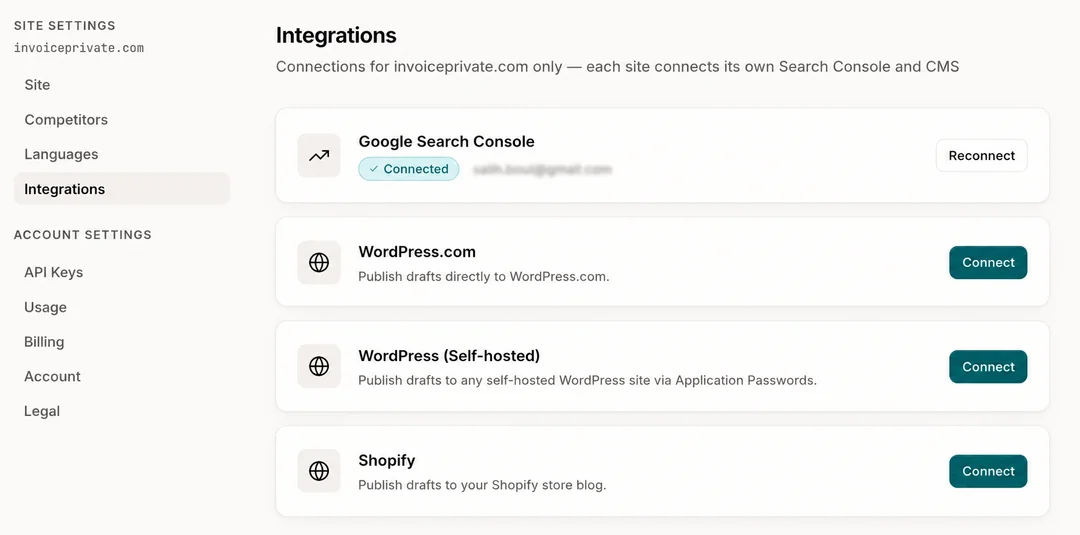
That's the actual settings screen — GSC connected, then a direct publish target chosen once and reused for every draft after.
The Real Cost of "Free"
Free isn't free once you count your own time. If a free plugin saves you from manually writing 50 meta descriptions, that's real value. But if you're spending three hours a week manually researching keyword gaps, writing briefs, formatting drafts, and publishing them one by one across WordPress and Shopify, you've just built yourself an unpaid part-time SEO job with worse output than a system designed to do exactly that.
Winnability beats volume every time, and free tools generally optimize for neither — they optimize for hygiene. That's fine for a five-page site. It breaks down fast once you're trying to build the 30 to 50 pages of topical depth that actually move a SaaS or ecommerce blog into competitive rankings.
The honest advice: use free tools for what they're good at. Let a free WordPress plugin or Shopify app handle metadata, alt text, and speed. Don't ask them to do keyword strategy or content production — that's not a fair fight, and pretending otherwise wastes months.
How Do You Find the Keywords Your Competitors Rank For and You Don't?
Run a competitor domain through a gap analysis tool that compares your ranking keywords against theirs, filters for terms with real search intent, and flags the ones within reach based on your current domain strength — that's what separates a keyword gap from a keyword wishlist. WriteGap runs this automatically every week and turns each gap into a ready-to-publish keyword brief, so instead of a spreadsheet of keyword ideas, you get an actual article sitting in your WordPress or Shopify drafts, waiting for one click.